Automatic Password Reset and Account Unlock
This section allows you to automate password and account management tasks across your Active Directory environment. You can create schedules to automatically reset expired passwords and unlock locked-out user accounts, reducing administrative effort and ensuring uninterrupted user access. Additionally, you can synchronize password reset and account unlock status updates across all domain controllers (DCs) to maintain consistency throughout the domain.
How to create a schedule to automate password reset and account unlock
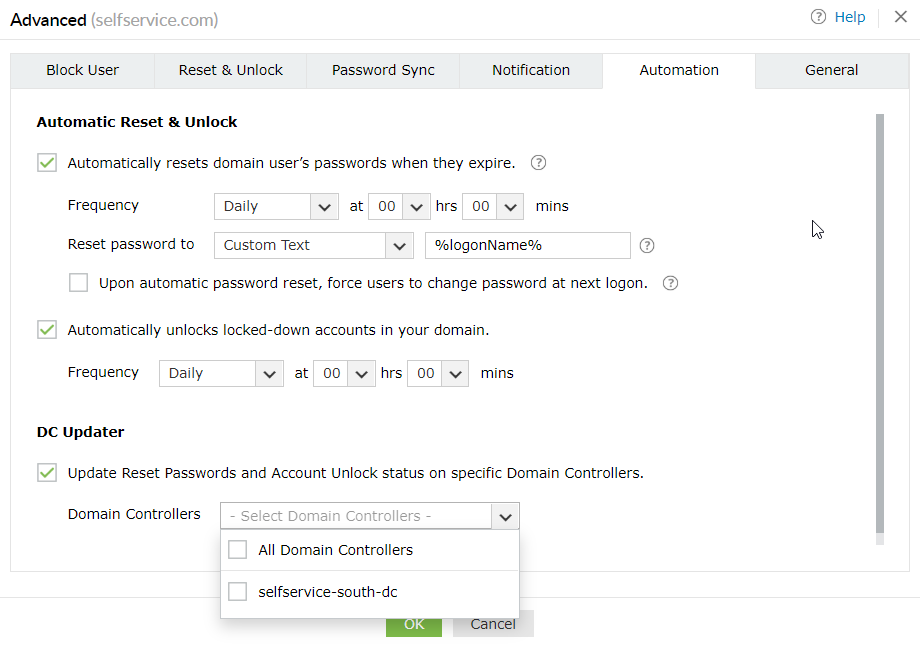
- Go to the Automation tab.
-
Select the Automatically resets domain user’s passwords when they expire option to configure a schedule to automate password reset.
- Specify the notification frequency.
- Specify the format in which the passwords will be generated. Select Custom Text from the drop-down list to generate passwords in accordance with the assigned AD attribute. If you want the passwords generated based on the password policy configured in ADSelfService Plus, select Password Policy.
-
Select the Automatically unlocks locked-down accounts in your domain option to create a schedule to automate account unlock.
- Specify the notification frequency.
How to update the password reset/account unlock status in all DCs
- Go to the Automation tab.
- Select the Update Reset Passwords and Account Unlock status on specific Domain Controllers option.
- Choose required domain controllers from the drop down field : Domain Controllers
- Select OK